

Don’t upgrade to Macos Sonoma yet if you’re taking the LSAT
Update: LSAC has now confirmed Prometric supports Macos Sonoma. It is safe to update. The rest of this post remains as it was originally published.
———
Quick update for those of you taking October and November. According to a reddit report, Prometric does NOT support Macos Sonoma, the new Macos operating system.
I was on the on the verge of installing this myself. Apple release Sonoma early this year and it is very stable. But as Prometric does not support it and have no published timeline for doing so, please do not update yet. Stay on Macos Ventura or below.
If you already did upgrade, no need to panic. You have three good options.
1. Borrow someone’s computer. Any computer will do for test day. Just test it first with a preptest and Prometric’s check tool.
2. Run Bootcamp (Intel Mac’s only): Bootcamp was Apple’s method for running Windows on a mac. If you have an Intel Mac, you can use bootcamp to install windows on your computer and take the LSAT there. To check if you have an intel mac, do this: Apple Logo ➞ About this mac ➞ Look at the processor. If it says intel, it is intel. If it says M1, M2 or apple silicon, you don’t have intel. Here is a guide for installing bootcamp.
3. Boot Macos from an external drive: You can boot macos from an external hard drive. A 1 TB samsung T7 SSD drive costs $79. Then, follow this guide to format your external as a boot drive for Macos Ventura and try doing a PT booted from this external SSD.
If you have trouble with any of this, I recommend asking your nerdiest friend, or hiring a computer consultant. I’ve done both and would be happy to advise in a tutoring lesson, but I expect you could get it done for much less with a computer consultant.
I’ll reiterate that if you haven’t updated yet, do not do so until Prometric confirms compatibility. You can find more commentary on this Reddit post. It is surprising there has been no announcement on this point from LSAC.
Video Guide to Macos Sonoma and the LSAT
In this video I walk you through the options above, and how to boot from an external or use bootcamp.
Testing Your New Setup For LSAT Test Day
If you are using another computer, Bootcamp, or an external drive, you can test your setup at the following links.
- Prometric Testing tool
- LSAC Lawhub (take a preptest here)
- Check your version with Apple Menu ➞ About this Mac. It should say Ventura.
Note: Prometric’s tool seemingly shows Sonoma as compatible. Official word is this is false. You need to check you have Ventura.
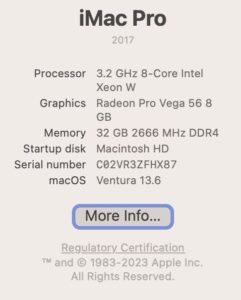
How to check if you have Ventura
Hope this helps! Have you found another solution to use Ventura? Let us know in the comments below.

Hi there, the Prometric website states macOS 13.0-13.2.1 are not supported… anything higher should be. I ran diagnostics on mine computer which is at macOS 14.0 and it went smooth.
There was a time when 14.0 wasn’t supported even though they didn’t list it – and even though it passed diagnostics. Fortunately, Sonoma is supported now.
I’d recommend reading this later after a major Macos release in the fall to wait for LSAC before updating.
Were you able to take the October LSAT with 14.0?